

Introduction: Android 17 and the June Pixel Drop are Here
The tech world has been eagerly awaiting Google’s next major step forward, and it has finally arrived. Android 17 and the June Pixel Feature Drop landed together this week, delivering a comprehensive suite of updates designed to satisfy both power users and casual smartphone owners alike. While some of these features are incredibly flashy and bound to capture headlines, others are quiet, highly requested quality-of-life fixes that solve long-standing user complaints. Crucially, Google is also expanding accessibility, bringing previous flagship-exclusive features down to mid-range and budget devices.

1. Redefining Foldable Gaming: The Pixel Fold Split Layout
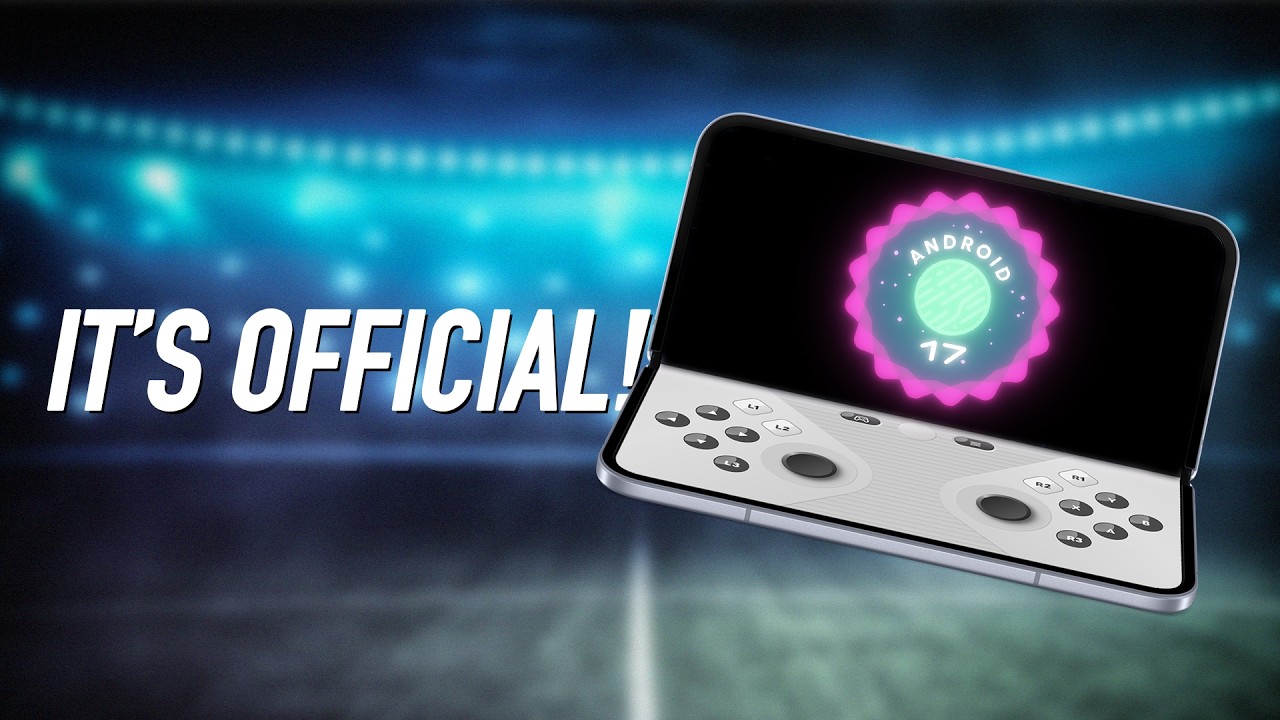
If there is one flashy feature destined to dominate social media, it is the new dedicated gaming layout for foldables. When you unfold a Pixel Fold under Android 17, the operating system can now split the expansive inner screen into a proper, ergonomically designed 50/50 gaming console layout. Instead of awkwardly stretching a standard smartphone user interface across a wider canvas, the top half of the fold becomes your dedicated, uninterrupted viewing screen. Meanwhile, the bottom half transforms into a dynamic, interactive gamepad complete with highly responsive shoulder buttons and face buttons laid out like a physical controller.
For gamers who prefer playing with external hardware, Android 17 also introduces native controller remapping. No longer will you be forced to struggle with whatever arbitrary button configuration a mobile game developer assumed you would want. This subtle but massive adjustment resolves a persistent frustration for cloud gaming enthusiasts who use Bluetooth controllers on Android. To support this visually demanding experience, Google has optimized performance with an aggressive memory cleaner. This software tweak improves resource efficiency to eliminate frame drops and stuttering during high-intensity gaming sessions—a crucial addition for foldables, which historically run hotter and demand more battery to power their massive displays.
Ultimately, this update addresses the persistent identity crisis that foldables have faced since inception. Rather than unfolding your device just to scroll through a wider web browser before closing it again, you now have a compelling, highly engaging reason to unfold your phone. Google notes that this layout is rolling out progressively over the next few months as game developers optimize their titles for this native layout.
2. Supercharged Multitasking with the New ‘Bubble’ System
While gaming gets the clicks, the new multitasking system in Android 17 is something that will improve your day-to-day productivity. Multitasking on a mobile device has historically felt like a chore, but Google is attempting to change that. Now, by simply long-pressing any app icon on your screen, you can transform that app into a floating “bubble.” These small windows float seamlessly over your active workspace, allowing you to quickly reference your calendar while typing an email, track a sports score while texting, or follow a video tutorial in one app while executing the steps in another.
Android 17 allows you to stack up to five of these active bubbles simultaneously. On larger displays and foldables, these bubbles gracefully dock into a dedicated “bubble bar” at the bottom of the screen. A single tap allows you to toggle between active bubbles, resize them, or instantly expand them to full screen. What makes this feature truly stand out is its friction-free accessibility; because the entry point is a simple long-press on a familiar app icon, it is highly likely to become a natural part of users’ muscle memory rather than a forgotten menu setting.

3. The Ultimate Mobile Content Creation Suite
Content creators are receiving a massive boost in this feature drop with several native, built-in tools designed to streamline the creative workflow without the need for third-party subscriptions. First among these is the brand-new Screen Reactions feature. Built directly into the native screen recording toolbar, creators can now capture their screen and their selfie camera simultaneously. This creates a real-time facecam overlay—complete with no-green-screen background removal—perfect for reaction videos, gaming let’s-plays, or walkthroughs.
Furthermore, Google has integrated two incredibly powerful AI generation engines:
- Gemini Omni: Gated for Gemini Pro subscribers, this cutting-edge tool allows creators to generate and edit high-quality videos using simple, natural language prompts. Simply type out your visual concept, choose the shot style, and describe the camera action, and Omni will output custom video footage directly onto your device.
- Leia: A specialized audio generation tool that lets you prompt Google’s AI assistant with a musical style, tempo, or vocal direction. Leia then generates an original, customized soundtrack to score your videos, effectively bypassing any potential copyright claim issues.
Combined, these features essentially form an all-in-one production studio right inside your pocket, letting you record, generate visual assets, and score your project without ever leaving your Pixel’s ecosystem.
4. Bulletproof Security and Privacy Upgrades
For many, the most important updates are those that protect user privacy and secure personal data. Google has introduced several highly practical changes to address modern digital threats in Android 17. Location sharing has become significantly more secure; you can now grant apps temporary access to your precise location, resolving the frustrating binary choice between always-on tracking and completely disabling location permissions. Similarly, contact sharing has been granularized. Instead of handing an untrusted application access to your entire address book, you can selectively share individual contacts.
The most crucial security upgrade, however, belongs to the Find Hub’s new “Mark as Lost” mode. If your phone goes missing, activating this mode instantly locks the device with mandatory biometric authentication (such as your fingerprint or face unlock). Even if a thief has somehow managed to spy on you and steal your numerical passcode, they cannot access your personal files or disable active device tracking. Coupled with improved live threat detection to catch malicious apps, beefed-up advanced protection modes, and longer wait times between failed PIN attempts to prevent brute-forcing, Google has constructed an incredibly secure perimeter around your data.

5. Democratizing Features: The Flagship Trickle-Down Effect
In an admirable move, Google is actively democratizing features that were once reserved solely for its most expensive flagship hardware. The June update sees several key elements expanding to budget-conscious models and new international markets:
- Voice Translate: The incredibly futuristic, real-time call translation feature that mimics your natural speaking voice has trickled down from the Pixel 10 Pro series to the standard Pixel 10.
- Quick Share: Pixel 9a and 8a devices are gaining AirDrop compatibility, making cross-platform file sharing within mixed iOS and Android households significantly smoother.
- Manual Call Screen: Google’s helpful Call Assist feature, which screens unknown callers before you pick up, is officially expanding to the Pixel 10 series in India.
- Magic Q: This contextual search and helper tool is expanding its capabilities to support an array of popular third-party messaging applications.
- Conversational Photo Editing: Powered by Gemini inside Google Photos, this natural-language editing tool is officially landing for users in Germany, the UK, France, Spain, and Italy.
Conclusion: A Must-Install Update for Pixel Users
While the gaming layout and AI-driven creation tools will undoubtedly collect the most attention, the true success of Android 17 and the June Pixel Feature Drop lies in how effectively it patches long-standing software gaps. From a vastly improved security suite that mitigates the terror of a lost phone to a highly intuitive multitasking interface and cross-platform sharing capabilities, Google has delivered a thoroughly polished update. The rollout officially begins on June 16th. If you have been waiting on the fence about whether to join the Pixel ecosystem, this massive update makes a highly compelling argument to jump right in.